VPS Sunucu Nedir? Kimler İçin Uygundur?
VPS (Virtual Private Server) sunucu nedir, nasıl çalışır, kimler için uygundur? Shared hosting ile farkları, avantajları ve hosted.cloud VPS çözümleri.
Ahmet Yılmaz
Kıdemli Altyapı Mühendisi
Siteniz yavaşlıyor, kontrol panelinde CPU limiti uyarıları çıkıyor ve her trafik artışında 503 hatası mı alıyorsunuz? Büyük olasılıkla paylaşımlı hosting sınırlarına ulaştınız. VPS sunucu (Virtual Private Server), aynı fiziksel donanımı paylaşmanıza rağmen size ayrılmış CPU, RAM ve disk kaynakları sunan sanallaştırma teknolojisidir. Bu rehberde VPS ile paylaşımlı hosting arasındaki teknik farkları, geçiş zamanlamasını ve ilk kurulumda dikkat edilmesi gereken adımları ele alıyoruz.
VPS Sunucu Nedir?
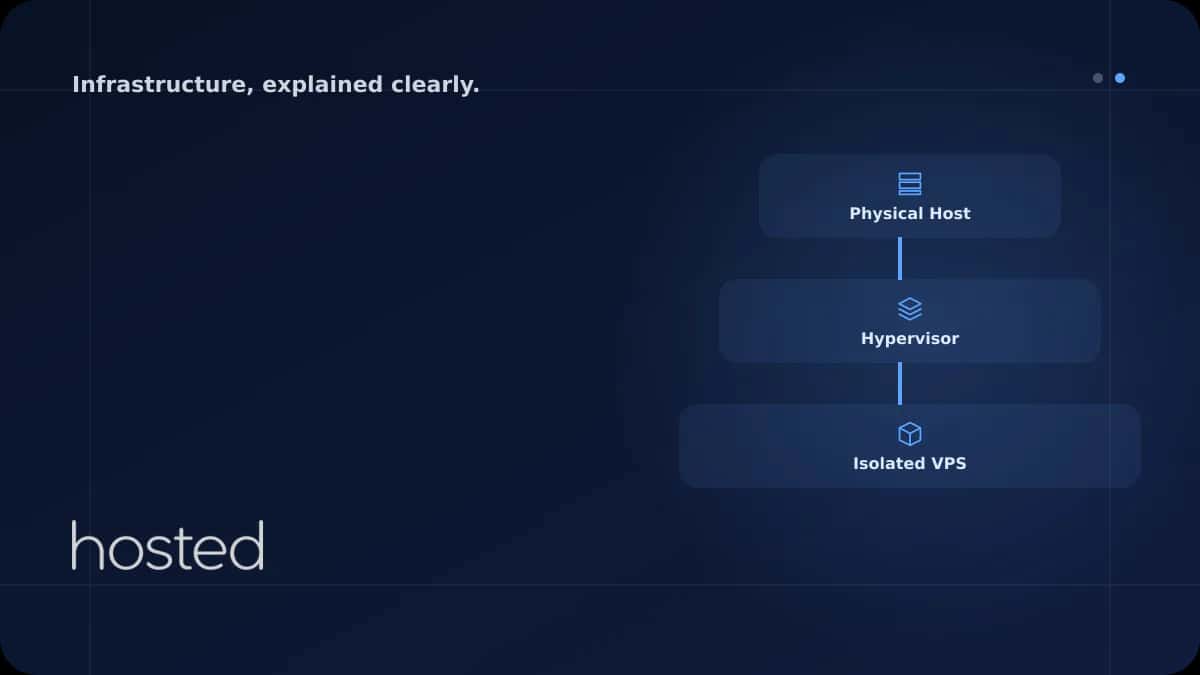
VPS sunucu, bir fiziksel sunucunun hipervizör (KVM, Xen veya VMware gibi) yazılımıyla birbirinden izole sanal makinelere bölünmesiyle oluşturulur. Her sanal makine kendi işletim sistemini çalıştırır, root erişimine sahiptir ve tahsis edilen kaynakları (CPU çekirdeği, RAM, disk alanı) yalnızca kendisi kullanır.
Bunu bir apartman dairesi gibi düşünebilirsiniz: aynı binada (fiziksel sunucu) yaşarsınız ama kendi duvarlarınız, kendi elektrik sayacınız ve kendi anahtarınız vardır. Komşunuzun yaptığı işlem sizin performansınızı doğrudan etkilemez.
💡 İpucu: Modern VPS sağlayıcıları genellikle KVM tabanlı sanallaştırma kullanır. KVM, Linux çekirdeğine entegre bir hipervizör olduğu için donanım düzeyinde izolasyon sağlar ve "noisy neighbor" (gürültücü komşu) etkisini minimize eder.
VPS Türleri: Managed ve Unmanaged
Unmanaged (Yönetilmeyen) VPS: Sunucu size teslim edilir; işletim sistemi kurulumu, güvenlik güncellemeleri, firewall yapılandırması ve yedekleme tamamen sizin sorumluluğunuzdadır. Temel Linux bilgisi gerektirir.
Managed (Yönetilen) VPS: Sağlayıcı güvenlik yamalarını, izlemeyi ve temel yapılandırmayı üstlenir. Teknik ekibi olmayan küçük işletmeler için uygundur ancak maliyeti daha yüksektir.
Paylaşımlı Hosting Nedir?
Paylaşımlı hosting, tek bir sunucunun CPU, RAM ve disk kaynaklarının yüzlerce hatta binlerce web sitesi arasında ortaklaşa kullanıldığı barındırma modelidir. Sağlayıcı, cPanel veya Plesk gibi bir kontrol paneli üzerinden sınırlı yönetim imkânı sunar; root erişimi yoktur.
Maliyet açısından en uygun seçenektir: aylık birkaç dolarla başlayan planlar mevcuttur. Kişisel bloglar, portfolyo siteleri veya günlük birkaç yüz ziyaretçi alan küçük işletme siteleri için yeterlidir. Ancak aynı sunucudaki başka bir sitenin ani trafik artışı sizin sitenizi de yavaşlatabilir - bu "noisy neighbor" etkisi paylaşımlı hostingin en bilinen kısıtıdır.
⚠️ Önemli Uyarı: Paylaşımlı hostingde aynı IP adresini yüzlerce site kullanır. Aynı IP'deki başka bir site spam veya kötü amaçlı yazılım nedeniyle kara listeye alınırsa, sizin e-posta teslim oranınız ve hatta SEO performansınız olumsuz etkilenebilir.
VPS ve Paylaşımlı Hosting: Teknik Karşılaştırma
Aşağıdaki tablo, iki barındırma modelini teknik açıdan karşılaştırır. Karar verirken yalnızca fiyata değil, projenizin kaynak ihtiyacına ve büyüme planına bakmanız gerekir.
| Özellik | Paylaşımlı Hosting | VPS Sunucu |
|---|---|---|
| Kaynak Tahsisi | Paylaşımlı (yüzlerce site ortak) | Ayrılmış CPU, RAM, disk |
| Root Erişimi | Yok | Tam root / sudo erişimi |
| İşletim Sistemi | Sağlayıcının belirlediği (genellikle Linux) | Seçilebilir (Ubuntu, Debian, CentOS, Windows) |
| Performans Tutarlılığı | Değişken (noisy neighbor riski) | Tutarlı ve öngörülebilir |
| Ölçeklenebilirlik | Sınırlı (plan yükseltme) | Anlık kaynak artırımı |
| Güvenlik İzolasyonu | Düşük (ortak IP ve dosya sistemi) | Yüksek (ayrı çekirdek, ayrı dosya sistemi) |
| Özel Yazılım Kurulumu | Kısıtlı (panel desteklediği kadar) | Sınırsız (Docker, Redis, Elasticsearch vb.) |
| Fiyat Aralığı | Aylık ~$2–15 | Aylık ~$5–80+ (kaynak bağımlı) |
VPS'e Ne Zaman Geçilmeli? 7 Kritik İşaret
Paylaşımlı hostingden VPS'e geçiş kararı genellikle performans sorunları belirginleştiğinde gündeme gelir. Aşağıdaki işaretlerden üç veya daha fazlasını yaşıyorsanız, geçiş zamanı gelmiş demektir.
-
1. Sayfa yükleme süreleri 3 saniyeyi aşıyor Google'ın Core Web Vitals verilerine göre LCP (Largest Contentful Paint) 2.5 saniyenin altında olmalıdır. Paylaşımlı hostingde bu eşiği tutturmak giderek zorlaşıyorsa, ayrılmış kaynaklara ihtiyacınız var.
-
2. CPU veya RAM limit uyarıları alıyorsunuz cPanel'de "Resource Usage" bölümünde sürekli kırmızı çubuklar görüyorsanız, paylaşımlı planınızın kaynak kotasını aşıyorsunuz demektir.
-
3. Günlük ziyaretçi sayınız 1.000'i geçti Dinamik içerik sunan (WordPress, Laravel, Node.js) sitelerde günlük 1.000+ tekil ziyaretçi, paylaşımlı hostingin rahat kaldırabileceği sınırın üzerindedir.
-
4. Özel yazılım veya servis kurmanız gerekiyor Redis, Elasticsearch, Node.js runtime, Docker veya özel PHP eklentileri gibi bileşenler paylaşımlı hostingde kurulamaz. Root erişimi şarttır.
-
5. SSL, firewall veya güvenlik yapılandırmasında esneklik istiyorsunuz Özel iptables kuralları, Fail2Ban, ModSecurity veya Let's Encrypt wildcard sertifikası gibi güvenlik katmanlarını yalnızca VPS'te tam kontrollü yapılandırabilirsiniz.
-
6. E-ticaret veya ödeme sistemi çalıştırıyorsunuz PCI DSS uyumluluğu gerektiren ödeme altyapıları, izole ortam ve özel güvenlik yapılandırması ister. Paylaşımlı hosting bu gereksinimleri karşılayamaz.
-
7. Birden fazla site veya uygulama barındırıyorsunuz Tek bir VPS üzerinde Nginx reverse proxy ile birden fazla domain'i yönetebilir, her birine farklı kaynak limiti atayabilirsiniz. Nginx reverse proxy rehberimize göz atabilirsiniz.
VPS Sunucunun Somut Avantajları
Performans ve Kaynak Garantisi
VPS'te size tahsis edilen 2 vCPU ve 4 GB RAM, yalnızca sizin iş yükünüz tarafından kullanılır. Paylaşımlı hostingde ise "sınırsız" olarak pazarlanan kaynaklar aslında fair-use politikasıyla kısıtlıdır ve sağlayıcı istediği zaman hesabınızı askıya alabilir.
Tam Kontrol ve Özelleştirme
İşletim sistemi seçiminden PHP sürümüne, web sunucusu yapılandırmasından cron job zamanlamasına kadar her şeyi kontrol edersiniz. Örneğin, WordPress siteniz için bulut sunucu üzerinde Redis object cache + Nginx FastCGI cache kombinasyonu kurarak sayfa yükleme süresini 200 ms altına çekebilirsiniz.
Dikey ve Yatay Ölçeklenme
Trafik artışında RAM veya CPU eklemek (dikey ölçekleme) dakikalar içinde yapılabilir. Daha büyük projelerde ise load balancer arkasına birden fazla VPS ekleyerek yatay ölçekleme mümkündür. Paylaşımlı hostingde tek seçenek plan yükseltmektir ve bu genellikle sınırlı bir tavana sahiptir.
VPS Kime Uygun Değil?
VPS her proje için doğru seçim olmayabilir. Aşağıdaki durumlarda paylaşımlı hosting hâlâ mantıklıdır:
-
Statik veya düşük trafikli kişisel siteler Günlük 100-200 ziyaretçi alan bir portfolyo veya blog için VPS gereksiz maliyet yaratır.
-
Sıfır teknik bilgi ve öğrenme isteği Unmanaged VPS, temel Linux komutları (SSH bağlantısı, paket yönetimi, dosya izinleri) bilgisi gerektirir. Bu bilgiye sahip değilseniz ve öğrenmeye zaman ayıramıyorsanız, managed hosting veya paylaşımlı hosting daha güvenli bir seçimdir.
-
Çok sınırlı bütçe Aylık $2-5 bütçeniz varsa paylaşımlı hosting başlangıç için yeterlidir. Ancak siteniz büyüdüğünde geçiş planınızı şimdiden yapmanızda fayda var.
İlk VPS Kurulumunda Yapılması Gerekenler
VPS'inizi aldıktan sonra güvenli ve performanslı bir ortam için aşağıdaki adımları sırasıyla uygulayın.
# 1. Sistem güncellemesi
sudo apt update && sudo apt upgrade -y

# 2. Yeni kullanıcı oluştur (root ile çalışmayın)
adduser deployer
usermod -aG sudo deployer

# 3. SSH anahtar tabanlı girişi etkinleştir
mkdir -p /home/deployer/.ssh
cp ~/.ssh/authorized_keys /home/deployer/.ssh/
chown -R deployer:deployer /home/deployer/.ssh

# 4. SSH portunu değiştir ve root girişini kapat
nano /etc/ssh/sshd_config
# Port 2222
# PermitRootLogin no
# PasswordAuthentication no

# 5. Firewall yapılandırması
ufw allow 2222/tcp
ufw allow 80/tcp
ufw allow 443/tcp
ufw enable
⚠️ Önemli Uyarı: UFW'yi etkinleştirmeden önce SSH portunuzu (varsayılan 22 veya değiştirdiğiniz port) allow listesine eklediğinizden emin olun. Aksi halde sunucunuza erişiminizi kaybedersiniz.
SSH güçlendirme konusunda daha detaylı bilgi için SSH Güçlendirme rehberimizi inceleyebilirsiniz. Ayrıca SSH.com'un resmi anahtar oluşturma dokümantasyonu da faydalı bir referanstır.
Sıkça Sorulan Sorular
VPS sunucu kullanmak için Linux bilmek şart mı?
Unmanaged VPS için temel SSH bağlantısı, dosya yönetimi ve paket kurulumu bilgisi gerekir. Ancak managed VPS hizmetlerinde sağlayıcı bu işlemleri sizin adınıza yapar. Başlangıç seviyesindeyseniz Ubuntu gibi geniş topluluk desteğine sahip bir dağıtım tercih edin.
VPS ile cloud sunucu arasındaki fark nedir?
Geleneksel VPS tek bir fiziksel sunucuya bağlıdır; o sunucu arızalanırsa VPS'iniz de etkilenir. Cloud sunucu ise birden fazla fiziksel sunucu üzerinde dağıtık çalışır, donanım arızasında otomatik olarak başka bir düğüme taşınır. Hosted Cloud bulut sunucuları bu yüksek erişilebilirlik mimarisini kullanır.
Paylaşımlı hostingden VPS'e geçerken veri kaybı yaşar mıyım?
Doğru planlama ile hayır. Önce VPS'i hazırlayın, dosyaları ve veritabanını taşıyın, DNS TTL değerini düşürün (300 saniye), test edin ve ardından DNS'i yeni sunucuya yönlendirin. Bu süreçte eski hosting aktif kalmaya devam eder.
VPS sunucu için ne kadar RAM yeterlidir?
WordPress veya basit bir web uygulaması için 2 GB RAM yeterli bir başlangıçtır. E-ticaret siteleri veya veritabanı yoğun uygulamalar için 4-8 GB önerilir. htop veya free -h komutlarıyla gerçek kullanımınızı izleyerek karar verin.
VPS sunucumun güvenliğini nasıl sağlarım?
Temel adımlar: SSH portunu değiştirin, root girişini kapatın, anahtar tabanlı kimlik doğrulama kullanın, Fail2Ban kurun, UFW/iptables ile yalnızca gerekli portları açın ve düzenli güvenlik güncellemelerini otomatikleştirin.
Sonuç
VPS sunucu, paylaşımlı hostingin kaynak sınırlarına takılan, daha fazla kontrol ve güvenlik isteyen projeler için doğal bir sonraki adımdır. Sayfa yükleme süreleri artıyor, kaynak limitlerine takılıyor veya özel yazılım kurmanız gerekiyorsa geçiş zamanı gelmiştir. Geçiş sürecinde DNS TTL'i düşürmeyi, verileri önceden test ortamında doğrulamayı ve ilk kurulumda SSH güçlendirme adımlarını uygulamayı unutmayın.
Paylaşımlı Hostingden VPS'e Geçmeye Hazır mısınız?
Hosted Cloud'un NVMe SSD destekli bulut sunucuları ile sitenize ayrılmış kaynak, tam root erişimi ve 7/24 teknik destek sağlayın.
Bulut Sunucu Planlarını İncele →Ahmet Yılmaz
Kıdemli Altyapı Mühendisi
10 yılı aşkın bulut altyapısı ve DevOps deneyimiyle Hosted Cloud'un teknik ekibinde yer almaktadır. Kubernetes, Terraform ve yüksek erişilebilirlik mimarileri üzerine uzmanlaşmıştır.
Yorumlar yakında