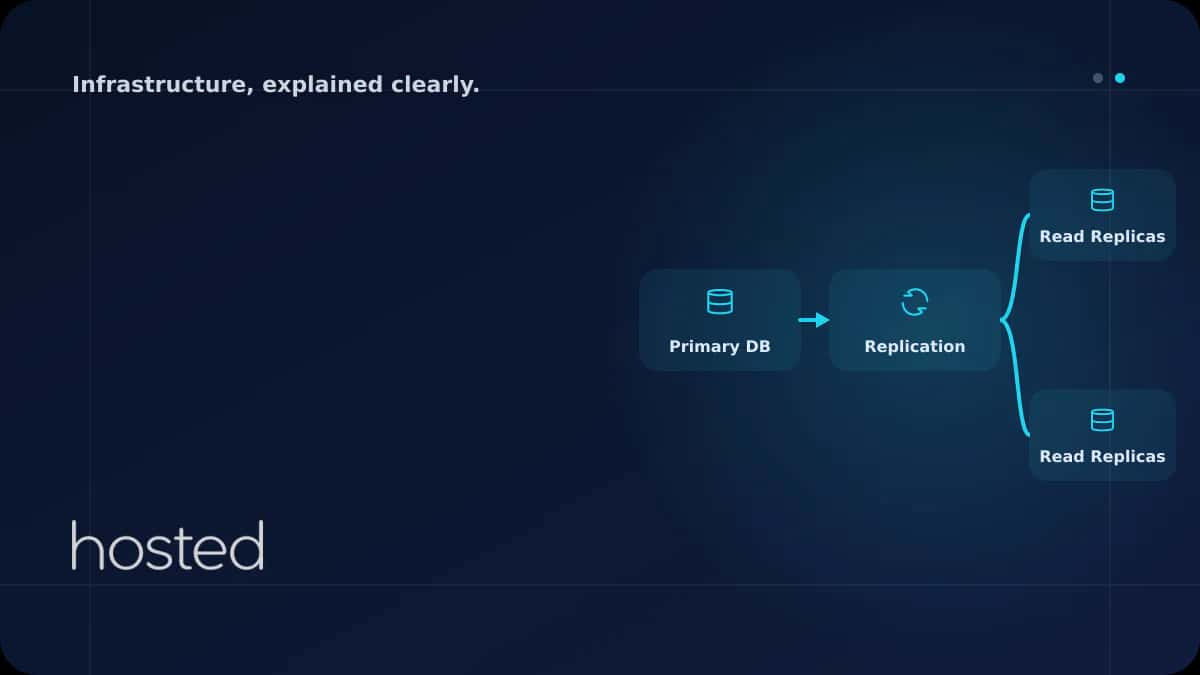
Read Replica ile Veritabanı Yükünü Dağıtmak - Master-Slave Replikasyon
Tek bir veritabanı sunucusu hem okuma hem yazma isteklerini karşıladığında, trafik arttıkça yanıt süreleri uzar ve CPU/IO doygunluğa ulaşır. Read replica, yazma işlemlerini primary (master) sunucuda tutarken okuma sorgularını bir veya birden fazla replica sunucuya yönlendirerek veritabanı yükünü dağ
Can Kaya
Güvenlik Uzmanı
Tek bir veritabanı sunucusu hem okuma hem yazma isteklerini karşıladığında, trafik arttıkça yanıt süreleri uzar ve CPU/IO doygunluğa ulaşır. Read replica, yazma işlemlerini primary (master) sunucuda tutarken okuma sorgularını bir veya birden fazla replica sunucuya yönlendirerek veritabanı yükünü dağıtır. Çoğu web uygulamasında okuma/yazma oranı 80/20 veya 90/10 olduğundan, read replica eklemek tek başına kapasiteyi 3-5x artırabilir. Bu rehberde PostgreSQL ve MySQL için read replica kurulumunu, replikasyon lag yönetimini ve uygulama katmanında yük dengeleme stratejilerini açıklıyoruz.
Read Replica Nasıl Çalışır?
Primary (Master)
Tüm yazma işlemlerini (INSERT, UPDATE, DELETE) kabul eder. Değişiklikleri WAL/binlog üzerinden replica'lara iletir.
Replica (Slave)
Sadece okuma sorgularını (SELECT) karşılar. Primary'den gelen değişiklikleri asenkron veya senkron olarak uygular.
Replikasyon
Asenkron replikasyon düşük latency sağlar ancak kısa süreli veri gecikmesi (lag) olabilir. Senkron replikasyon tutarlılık garanti eder ancak yazma latency'sini artırır.
PostgreSQL Streaming Replication
Primary sunucuda replikasyon ayarları:
wal_level = replica
max_wal_senders = 5
wal_keep_size = 1GB
hot_standby = on
Replica sunucuda base backup alıp standby modunda başlatın:
# Primary'den base backup al
pg_basebackup -h primary-ip -D /var/lib/postgresql/16/main \
  -U replicator -Fp -Xs -P -R

# -R flagi standby.signal dosyasini ve primary_conninfo'yu olusturur
# Replica'yi baslat
sudo systemctl start postgresql

# Replikasyon durumunu kontrol et (Primary'de calistir)
SELECT client_addr, state, sent_lsn, replay_lsn,
       sent_lsn - replay_lsn AS lag_bytes
FROM pg_stat_replication;
⚠️ Replikasyon Lag: Asenkron replikasyonda replica, primary'den birkaç milisaniye ile birkaç saniye arasında geri kalabilir. Kullanıcı bir veri yazdıktan hemen sonra okuma yaparsa eski veriyi görebilir. Kritik okumalar (ör. ödeme sonrası sipariş durumu) için primary'den okuyun.
PostgreSQL optimizasyonu için PostgreSQL Performans Optimizasyonu rehberimizi, bağlantı yönetimi için PgBouncer rehberimizi, yedekleme için Veritabanı Yedekleme Otomasyonu rehberimizi inceleyin. PostgreSQL Replication Dokümantasyonu ve MySQL Replication Referansı ek kaynak olarak faydalıdır.
Sıkça Sorulan Sorular
Kaç read replica eklemeliyim?
Okuma trafiğinize bağlıdır. Çoğu uygulama için 1-2 replica yeterlidir. Her replica primary ile aynı donanıma sahip olmalıdır. Replica sayısını artırmak primary'deki WAL gönderme yükünü de artırır - 5'ten fazla replica için cascading replication düşünün.
Primary çökerse ne olur?
Replica'lardan birini primary'ye promote edebilirsiniz. PostgreSQL'de pg_promote() fonksiyonu veya pg_ctl promote komutu ile yapılır. Otomatik failover için Patroni veya repmgr gibi araçlar kullanın.
Read replica yedekleme yerine geçer mi?
Hayır. Replica, primary'deki tüm değişiklikleri (DROP TABLE dahil) uygular. Yanlışlıkla silinen veri replica'dan da silinir. Read replica yüksek erişilebilirlik ve okuma ölçekleme içindir, yedekleme için ayrı backup stratejisi gerekir.
Sonuç
Read replica, veritabanı ölçeklemenin en basit ve etkili yoludur. Okuma yoğun iş yüklerinde primary'nin yükünü önemli ölçüde azaltır. Replikasyon lag'ı yönetin, kritik okumalar için primary'yi kullanın ve otomatik failover yapılandırmasını ihmal etmeyin.
Veritabanı Replikasyonu İçin Güçlü Sunucular
Hosted Cloud'un düşük latency ağ altyapısı ile replikasyon lag'ını minimize edin.
Bulut Sunucu Planlarını İncele →Can Kaya
Güvenlik Uzmanı
Siber güvenlik, DDoS koruması ve sunucu sertleştirme konularında içerikler üretmektedir. CISSP sertifikalı güvenlik uzmanı.
Yorumlar yakında